Thursday, 16 December 2021

Streaming Companies: One Resolution to Rule them All.. or Why are we still on the Oliver 1080 Poverty breadline?

 Hello.. 

Oh wandering wisp of the of the internet.. or should that be Edna the Evil TV? Sit back and relax, grab a tea, coffee or beverage of choice while I, your town crier, regale you on how Streaming Companies of Mordor have locked us all in to 1080 and stagnated the industry..

Skeptical? I don't blame you, its a large and sweeping claim.. but for balance.. remember how locked we were with DX9? that thing just would not die! until; we starved it to death. Hear ye! Hear Ye!

Some time around.. oh 2010?.. we began to get HD content.. internet broadband was fast enough that spinning wheels were slowly disappearing all over YouTube and 'potato cam' of 240p was a thing of shame... 

Like coming out of a daydream and realizing you have been staring at your friend's grandmother's boobs, and look around and everyone is staring at you.. oh my! These Mordor companies need a wake up call that it's not okay to advertise 4K and not deliver on PC nor is it okay to drag everyone's eyesight down to Magoo levels because they don't have their stuff sorted with DRM.

And that's their so called excuse.. DRM.. but that seems like more of a 'you problem' than a 'me problem'.
It's not like I/we can fix the DRM for them!
It's the 2020's.. and we are still steaming 1080 with our superfast broadband we pay a lot of money for. And don't get me started on how janky and early beta HDR PC steaming is..

Even on TV.. I have a 4K Smart TV with the appropriate apps.. looks downscaled 2K @24fps. I'm just not convinced.

So.. is it okay to take the DRM out of 1080 and rip that? no? Why are we allowed 1080 then?
Ah! because they had to! They didn't have a choice! We all had 1080 TVs.. and they wanted our money.
Wait a minute! So why are they getting the choice this time? And don't we all have 4K TVs now..??

10 years of 1080 is far too long and no one is saying anything.

We are pacified and like Oliver with an empty bowl we meekly go up to them and say; please sir, can we have some more?

Remember we pay for these services and media.. they don't just provide it for free.. flip even YT channels with a tiny fraction of these companies budgets give (imho) most users their first taste of 4K.. isn't that a failure on the companies part?? That even though their customers were paying for something their customers had to go elsewhere to get the content..

We get 1080p @24fps.. not even 1080 @ 60fps which is bad enough but a miserly 24fps.
Oh how Fagan would cackle looking at their stock prices rise.. potato shame on all these companies.. *potato* I say sir!

So if we want 4K streaming one of two things has to happen.. either we stop subbing to their service or another legitimate service streaming provider comes along and blows them out of the water by offering.. flip.. at this point I'll even take 2K@60fps.

Here, in Scotland we have a tax from England on TVs called a TV Licence. It's money they take from ill-informed people. I refuse to pay it.. and so the law provisions that if I do not use terrestrial television, I need not pay for a licence.. meaning I am confined to certain catch-up & streaming services only. And even worse than this.. the BBC is a Unionist mouthpiece for the Tories, I am Scottish Nationalist, there is no way I paying money to fund the BBC (except buying Doctor Who on iTunes).

Evil Auntie Edna sits there with a huge smile on her face; hoovering up all that lovely subscription money and dishing out Magoo vision to PC users.

Aren't we the Master-race? .. well no. Not when it comes to getting these companies to cough up what is paid for and owed.

I tried.. Kodi with the CDM extension... I tried Bluestacks with the Chrome extension.. I tried *every* browser that I could find. Nothing would give me greater than 1080@24. And in Kodi it was worse with some crazy 896p thing.. I dunno iirc. 

Now add to this to the new culture that these companies are introducing us to.. start a show then cancel.

I am familiar with the idea of commerce.. if something is profitable then keep doing it.. however.. what if short changing us is more profitable? Would they just keep doing that?

And what we have left is.. 8 to 12 episode runs of shows then cancelled that we watched in 1080@24fps for .£120/€140/$160 a year

And there's the crux.. our *only* move is to unsubscribe.. they have us cornered and they know it. What they fear is mass unsubscription.. and would that really happen for an upgrade in resolution?

So we queue up again for some more 1080poverty.. cash in hand. Like its 2009.

peace


Dava


Evil Edna pictured right:

Oliver Magoo:


*Evil Auntie Edna.. allusion to Auntie Beeb = BBC


Tuesday, 21 April 2020

The Perfect Storm.. Or what would be the *Ideal* Graphics Card?

Hi www

I'd like to share a few thoughts.. I originally came up with these ideas for Intel.. however, they could be applied to make the *perfect* graphics card..


Why does data need to travel around so much?.. storage to RAM.. to CPU to VRAM to..Why??

What if we had the entire system on a card? A card that could be plugged into any current PC?

Imagine with me..

Intel brings out a graphics card, the card has a 6c12t CPU.. a co-processor to compliment your Desktop's CPU. The card has an astonishing 2TB of storage which is also it's RAM/VRAM.. this is not just fantasy, I'm talking about permanence of data.. you may not know it but.. PCIE Drives are equally as fast as RAM. But I admit.. 1/3rd (15GB/s) the speed of conventional VRAM..but we must also consider that, we are reading direct from source..

It also invites the idea.. one protocol to rule them all.. PCIE. (yes yes USB too but.. not for this context).

By PCIE 5.0 the protocol will over take the mighty 45GB/s VRAM.. potentially being 128GB/s for PCIE 5.0.

Limited PCIE Lanes might have been a problem, however due to us having everything on the card.. its not a problem, the card can be designed specifically with internal PCIE lanes in mind.

For Intel this strategy yields great advantages.. a closed ecosystem (the card itself).. the Apple Mac is a great example of what you can do if you control the factors available, Apple make their operating system lighter than the hardware, and so they know how the system will perform.

The same could be true for Intel.. firstly they would have to give up those airs and graces on price to get mass adoption... however this is the perfect storm we are dreaming up so let's say they do it..

Intel make a higher end graphics processor, they include a decent CPU, they pressure chip manufacturers for PCIE 5.0, they pressure everyone to pretty much skip 4.0.. and price it around £700/$850/€850

Thinking on how they control their own card ecosystem, they would have to adhere to the most common API.. which is DirectX. There is no sense in trying to make your own API.. as we seen with Vulcan and AMD.. sure OpenGL was great for a while and even outstripped DX but that was while Microsoft was dragging its heels for Xbox 360 and DX9. The smartest way to do business would be just to accept DX as~is.. and take every line of its code and make hardware that runs it so smoothly.. it becomes more than hardware running code... it becomes a lover reciting poetry..I'm going a bit left field here with the refs.. but that's why I left blogging on OCN.. well, one of the reasons.

Think of the card like this.. DX is like it's OS, as its CPU would be specifically designed to run DX code, it *can* run normal code just like any co-processor but its best at running DX.. as it's also a storage device, it has all the data ready for gaming.

It struck me that the system I have described isn't entirely a closed system.. as DX is by Microsoft and Intel couldn't change the code to suit their hardware, but it's not all one way, as Intel could lobby Microsoft for features and code that they wished in the long run.

Intel *could* with MS's permission make a DX derivative, but that would mean convincing publishers.. and then you are back in a situation like AMD and Vulcan.

No what is clean is.. knowing DX 'chapter & small print' and making custom hardware solution solely to run that code like butter. Like loose leafs of paper are caught by the wind.. think of each one with a drawing upon it, these are the textures.

CPU & GPU & Storage; in perfect harmony.

Dava

-----------

Refs:

Speed
*http://blog.logicalincrements.com/2018/08/data-transfer-rates-bandwidth-cpu-ram-pcie-m-2-sata-usb-hdmi/

Speed
*
https://www.pcworld.com/article/3400176/pcie-40-everything-you-need-to-know-specs-compatibility.html

Dava's Tenets of Basic Common Sense in game design.. or too many no-no's don't make a yes-yes!

Hi WWW

Here are some Cardinal Rules of game design:

Rule 1:

Don't mess with people's saves. EVER.

Rule 2:

Don't put an invisible walls anywhere inside the sandbox. to cage us inside is fine. But once inside; it is OUR PLAYGROUND.. no longer yours. .. stop picking at it.

Rule 3:

Intuitive control.. beg, borrow.. steal if you have to from other Devs and Dev publishers.. the middle tool is so vastly unimportant, that you, Dev, sweating about it, isn't helping! If a control method is popular use that instead.

Rule 4:

Let us skip EVERYTHING.. cutscenes, cinematics, intro movies (I am aware I own a Nvidia graphics card, no need to waste my time showing me a mini movie about it).

Rule 5:

Don't put things in the game I could mistake as a 'glitch'. Seriously.

Rule 6:

If I have near completed a quest and the final part fails .. not due to me misunderstanding what to do.. but the game did not allow me to do it; ensure you have checkpoints. If the game failed and not me.. that was your problem not mine.. so to stop any arguments between player and Dev.. have checkpoints while the mission is active.. if the player quits; they must *then* and *only then*.. have to restart the whole mission if it is not completed.

Rule 7:

All bugs MUST GO. Even if your game is 20 years old.. if you are making coin off the franchise and a bug is reported. fix it!


Break any of these rules and you are a BAD DEVELOPER.. it's like being a bad parent but instead  of disappointing a handful of kids.. disappointing 10's of thousands of people in one go.

@Publishers

Have a 'Gamma Team'.. who are much like Beta Testers in reverse. Gamma 'Testers'.. small team that covers all franchised games, that make coin for you as a publisher. Team of 5 to 10 people.. like a dead letter office of games publishing. You send annoyed or concerned players to them instead of  your media team having to deal with an old game.

Dava

-----

I *may* come back and update this with more.. but that's enough for now.

I would like to thank Ubisoft for inspiring this list.. FLIP!! It's just basic common courtesy.. don't mess with peoples save games! FC5-DLC. Whoever thought it was a good idea over at Ubisoft.. well they probably deserve all the twitter hate the Ubi media team had to deal with and I hope they passed that along to that person.. as 'feedback/suggestions'. I am sure other players had some suggestions what that Dev could do with the game!

Monday, 9 March 2020

The PCIE Lanes famine..or High Performance vs Drastically Reduced Functionality

Hi www

Today an amazing deal for a Ryzen came up. Less than half price!.. wow.. and then I thought.. 'wait don't newer CPU's have like no lanes?? (20 lanes) What does that mean for my many PCIE drives??..no, I don't have enough reason spend a fortune on a new rig, the rig I have (HP workstation) is more than capable and isn't PCIE gimped.'

Going forward we should even MORE lanes not less.. my dual X5650.. give 56 lanes EACH. Admittedly they are PCIE gen 2.. but.. 112 lanes of gen 2 vs 20 of gen3 or even 4.. nope.

This encourages me to do the unthinkable.. to recommend to people old tech.

I don't need the thing to be a server but I need the ability to have as many drives as I would like in the machine.

Let's face it.. if it's not PCIE its not the fastest possible speed. So it follows that all internal components should be PCIE to give us the fast possible performance.

Why do we need other busses in this day and age? What advantage does SATA have over PCIE?.. and even USB.. I DO think we should keep USB devices.. but couldn't the next new standard be a reworking of PCIE? For speed purposes only.. not the 75w requirement!

What can I get from on board busses that I couldn't get from a separate card of the same type?

To do as I suggest..we need 60 to 100+ lanes and 20 physical slots (at least 20 physical slots) each of the first four double spaced away from each other so no overlap. After that as tight as you like. These would be.. as I would dub them.. EXL-ATX boards and be near double the length of a ATX.. They would need fasteners at the side of the board for the lower 16 physical slots.. as the peripherals would be expected to be internal *only*..

I digress..

I don't why this isn't happening already.. but again I am bemused when case manufacturers don't work out a way to do vertical cases and insist on horizontal. The air wants to escape upwards anyway, why push it elsewhere?.. you would need a splash guard yes, but any decent fans would be able to be a splash guard anyway.

I digress .. again.. sorry..

We don't NEED all this new fancy hardware.. we have already reached a comfortable stage, however if the is .. IF THERE is to be new hardware, we should be designing it with the future in mind, not building in absurd obsolescence.

Dava 

Sunday, 29 December 2019

Intel Discrete Graphics Cards.. my take on what would be beneficial to the community and Intel

Hi www

So over much time, I have been thinking about Intel graphics cards since before Intel themselves took it seriously..

In short.. Intel need to build a consumer-ship from scratch, and on every side they have the potential to be squeezed out of the market.

So with that in mind, I have some.. recommendations for the Intel Graphics Department..

1. you need a catchy name for your cards that has nothing to do with your other products..  you already have 'Optaine'.. perhaps 'nitro' ? 'Intel Nitro Graphics Cards'.. it makes it stand out as its own thing, if you just called it Optaine, then it's likely to get drowned when people search for info and pricing when shopping for one..

2. Sad but true.. it'll have to be a mid range graphics card.. just throwing out some lowend thing is not very smart, or trying to compete with the ultra high end is equally not as smart..
a.on the low end the market is full of both new and second hand cards that are more than capable
b. on the high end your drivers and driver Devs need time to mature and handle games better, just throwing a load of power at something doesn't translate well to 'good gaming' just ask AMD who have had endless woes with their drivers.

What imho Intel needs to do is put out something.. around 2000 shader cores.. seeing its Intel.. 2048 shader cores because its nerdy :)) 120 TMU  64 ROUs  with 12GB of GDDR6   .. but with a pleasant caveat I'll come to in a moment.

(update 31/May/2022 : 6144 shader cores, 384 TMU, 194 ROUs, 48 RTC with 16GB GDDR6 for mid level, £/$200.. top level, double the above: 12288 shader codes, 768 TMU, 184 ROUs, 92 RTC with 24 to 32 GB GDDR6 £/$400 )

Why have the media/game data in a separate device? Why not throw an integrated 1TB-4TB stick of PCIE Optaine as part of the graphics card? Direct on the PCB, with Optaine chips specially designed not to be Graphics RAM, but as fast as Graphics RAM.. how? .. I would suggest that the card has its own PCIE bus lanes and mini CPU.. 'system on card' but with the entire purpose of creating graphics. Some easier parts could be sent to the mini-CPU (2c/4t Low Power cores recommended) and anything that required heavy lifting could be sent to the mainboard CPU.

Imagine those with weak CPUs.. they could buy your card without the worry of getting the worst possible performance if their CPU is pants.. as some of what is done will go to the on-card mini-CPU.

All those people who want an easy life.. plug in and play, if they have an old desktop with 2 cores but its all they have, they could buy your card and job done. Dad or Moms work PC? this card = job done just by plugging it in.

Even perhaps cards that have no need for VRam.. but read and process the data directly, from storage from the 'system on card'.

3. It is has to be CHEAP.. unfortunately for you,  you can't go the expensive route.. because you don't have driver confidence, and imho that will take 5 to 10 years of successful products including the drivers themselves.

NV is an excellent example of what a company can do if they pay attentions to gamers needs and put much effort in the features of their interface (NVCP). Not being able to make custom res's is a deal breaker for me.. something small like that even can make life just that bit nicer.

But NV isn't perfect.. oh they are the best in the business.. but still they have driver problems with each release.

And so with that explained.. Intel is new, doesn't matter your rep in the CPU market, this is GPUs and here its cut throat.. and its been mostly NV doing the cutting of the throats.

Being new means.. you need a competent product that is not irrelevant due to other companies offerings. You NEED to offer much more value for money than either competitor.. or AMD will swallow your marketshare whole.

So I suggest putting out the above card for around $250-300/£250-300. (update May 2022:mid level  £/$200)

Yes you will make a loss.. but you are buying customers loyalty in the hopes they try>enjoy>recommend.

Don't worry NV has done this before to when they hit a slump or messed up so badly everyone started talking about jumping ship to AMD..

What place is there in the market for Intel?


To begin with.. not much, however if you can beat AMD on price vs performance AND have competent drivers with decent features.. releasing a new card every two years (four years for new refresh).. ohw maybe need to explain this..

Every two years GPU manufacturers release 'new' cards.. they take the higher cards from their previous line and rebrand them as mid level cards while they get ready for totally new cards in two years.. so for Intel you would be starting with a blank slate and potentially only one or two cards so you couldn't do it this way until you had 6-8 years under your belt..but you could do an initial release and then 'beef up' the cards specs.. all the time in the interim tightening the drivers with feedback from customers..

Flip! no one will tell you this, but customer feedback is an essential component of GPU production.. because IF you listen to their feedback.. however obnoxious or nasty.. they may have a grain of truth in what they are trying to say.

Look at AMD.. ignores its customer feedback, drivers are usually awful. So they end up just throwing power at it and hope it works. That's not a good way to keep your fans.

For CPUs I was an AMD guy for many years, I used NV for Graphics cards.. I tried the AMD + AMD thing.. welp doesn't work if your drivers are nonsense. I bought a HP Workstation after a water incident.. with my twin Xeon X5650s (at the time of writing*) and am happy with them. I also rock a NV 2080ti.. but I'm not your target customer base just yet.. people who can afford this stuff will buy NV. They aren't coming over to be the test rabbits for your experiment..

Aim too high and no one will care. Aim too low and no one will care. Harsh but I imagine no one else will tell you this stuff.. and by the amount I have written.. I think you can see I have hopes for you in this marketspace, Intel.

I digress..

What place is there in the market for Intel?

To begin with.. not much, however if you can beat AMD on price vs performance AND have competent drivers with decent features.. releasing a new card every two years (four years for new refresh)..increasing your performance 10-20% every four years for the same amount of money for the same price point.

This is where Intel could snuggly fit into the market.. getting enough press about the gaming performance itself to salivate consumer appetites, all free press garnering curiosity and interest.. but something deeper.. prestige that people can tell other people they own one and have a conversation about owning one..  maybe I'm over stating it..yes I am but its illustrative of something Intel has NEVER needed to do.

Create a userbase and brand recognition from scratch.

Dava

------------

* Now I have a HP Z840 twin Xeon E5-2660v3's 20c/40t, DDR4-2133 32GB, 2080Ti, load of PCIE and SSD and couple of HDD, totalling idk 15TB? 4K TV and a small HP 900p monitor.

Old set up was.. twin Xeon X5650, 48GB of DDR3 1066, 2018ti/1070 and drives/monitors as above.

Sunday, 31 March 2019

Drive Capacities the return.. or a drive is a drive of course of course except of course when they are the famous mister RAID

----------------------------

Hi guys

Firstly please read my complaint of drive manufacturers laziness here:
https://ftr-ceu.blogspot.com/2018/08/ssd-and-drive-capacities-or-king-has-no.html

Q: What stops drive manufacturers putting multi layered PCB multi slot cards of M.2 (M Key) drives?
A: nothing..

The PCIE specification can default to the appropriate maximum speed, now while I do not recommend putting one of these hypothetical drives into a PCIE-1 x1.. it is much more common to have higher speeds.. even at a x16 PCIE-1 that's 250MB/s for 8 drives..but let's take a typical scenario;

Scenario 1

PCI-E 3/four slots of x16

15.8 GB/s

each PCB would have four 1TB drives in Raid JBOD (spanned)
Four PCBs would mean  750MB/s - upto 1GB/s  per PCB (still being double the SSD speed)
total: 16 Terabyte
RAID 0 Speed: upto 12GB/s

Suggested price point: £100/$130


each PCB shows up as a separate disk, which you can choose to software JBOD or RAID 0, using RAID 0 theoretically (if the RAID controller on the PCB is any good), usual max speeds are 3GB/s x four would be upto 12GB/s in RAID 0 for the entire drive.


-----

Scenario 2

PCI-E 4/four slots of x16

31.5GB/s

each PCB would have four 1TB drives in Raid JBOD (spanned)
Four PCBs would mean upto 7.8GB/s per PCB.
total: 16 Terabyte
RAID 0 Speed: upto 23.6GB/s

-----

Scenario 3

PCI-E 5/four slots of x16

63GB/s

each PCB would have four 1TB drives in Raid JBOD (spanned)
Four PCBs would mean upto 15.75GB/s per PCB.
total: 16 Terabyte
RAID 0 Speed: upto 47.25GB/s

-----


Scenario 4

PCI-E 4/four slots of x16

31.5GB/s

each PCB would have eight 1TB drives in Raid JBOD (spanned)
Four PCBs would mean upto 3.9GB/s per PCB.
total: 32 Terabyte
RAID 0 Speed: upto 23.6GB/s

Suggested price point: £230/$280

-----


Scenario 5

PCI-E 5/four slots of x16

63GB/s

each PCB would have eight 1TB drives in Raid JBOD (spanned)
Four PCBs would mean upto 7.8GB/s per PCB.
total: 32 Terabyte
RAID 0 Speed: upto 47.25GB/s

-----

Scenario 6

PCI-E 4/four slots of x16

31.5GB/s

each PCB would have eight 2TB drives in Raid JBOD (spanned)
Four PCBs would mean upto 3.9GB/s per PCB.
total: 64 Terabyte
RAID 0 Speed: upto 23.6GB/s

Suggested price point: £450/$500

------

Scenario 7

PCI-E 5/four slots of x16

63GB/s

each PCB would have eight 2TB drives in Raid JBOD (spanned)
Four PCBs would mean upto 7.8GB/s per PCB.
total: 64 Terabyte
RAID 0 Speed: upto 47.25GB/s

------

Scenario 8

PCI-E 4/four slots of x16

31.5GB/s

each PCB would have twelve 2TB drives in Raid JBOD (spanned)
Four PCBs would mean upto 1.95GB/s per PCB.
total: 96 Terabyte
RAID 0 Speed: upto 7.8GB/s

Suggested price point: £750/$900

------

Scenario 9

PCI-E 5/four slots of x16

63GB/s

each PCB would have twelve 2TB drives in Raid JBOD (spanned)
Four PCBs would mean upto 3.9GB/s per PCB.
total: 96 Terabyte
RAID 0 Speed: upto 15.6GB/s

------

Scenario 10 (industrial)

PCI-E 5/four slots of x16

63GB/s

each PCB would have twelve 4TB drives in Raid JBOD (spanned)
Four PCBs would mean upto 3.9GB/s per PCB.
total: 192 Terabyte
RAID 0 Speed: upto 15.6GB/s

192 Terabyte : Suggested price point: £1500/$1800

Inside the drive would be: a very slim riser with four slots, one for each Slave PCB, each would be x16 mechanically but through the onboard chip, each would be x4 electrically.

On the industrial drives, they have splitters to increase speeds:
A double sided PCIE Gold Connecter Master PCB, the splitter simply joins to the other side of the PCIE Connecter, then the end of splitter has multiple ends which fit into the various motherboard PCIE slots.

Price points grouped:

16 Terabyte : Suggested price point: £100/$130
32 Terabyte : Suggested price point: £230/$280
64 Terabyte : Suggested price point: £450/$500
96 Terabyte : Suggested price point: £750/$900

192 Terabyte : Suggested price point: £1500/$1800

::RANT> ::

OR Drive Manf.'s  can sit there and let users drown in drive management problems, not doing their job in this industry. Failing all consumers.To drag out mechanical drives for profit.
Remember its regularly 50GB A GAME! 1TB is filled by 20 games!!!

FAIL FAIL FAIL.

It's the same chips that are on SSDs using the SATA bus.. SATA is dead, only good for Optical Drives for ripping old discs.. long live the King PCIE!!

:: <RANT::

Sorry, its not EVERY company, but it just burns me to think of certain drive manufacturers sitting back and letting the cash roll in.. to the frustration of their customers.


Monday, 4 March 2019

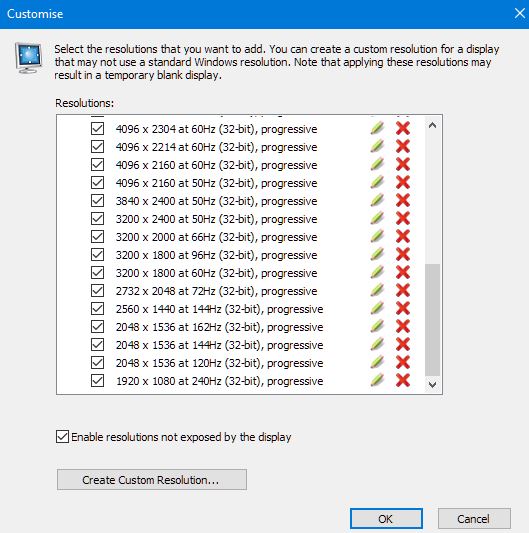
Refresh Rates CheatSheet for 4K TVs


Hi

Time to dump a load of info here:


Increased Refresh                                             Increased Resolution
----------------------                                                --------------------------

4K/60hz =                                                        4K/60hz =

1080 @ 240hz                                                  3200x2400 @ 72hz*
-2K-                                                                  3840x2400 @ 60hz
1536 @ 162hz                                                  4096x2560 @ 55hz
1440 @ 144hz                                                  5120x2160 @ 50hz
-3K-                                                                  5120x2560 @ 44hz
1800 @ 94hz                                                    6120x1900 @ 50hz
2048 @ 72hz*                                                  6120x2160 @ 40hz
                                                                          6120x2560 @ 35hz


All used NVCP. All used CVT Reduced Blank. on my Philips 4K 58" HDR TV (HDR was of course off). No Down or upsampling was used for the above resolutions, however in the pictures I think? I still had two test down sampled resolutions, but 95% of the ones in the pics are all active pixels.


To show all pixels were active:


------------------
Use this info at your own risk.


*3641x2048 = 16:9 for 2048p

*3K pix, but 2400 wider so 72hz.
-------------------

Big shoutout to those who helped me no end with their work and websites:

ARC  Aspect Ratio Calculator
https://andrew.hedges.name/experiments/aspect_ratio/

Good place to start learning:
https://en.wikipedia.org/wiki/List_of_common_resolutions

Aspect Ratio Table Cheat Sheet:
https://www.unravel.com.au/aspect-ratio-cheat-sheet

16:9 Cheat Sheet:
https://pacoup.com/2011/06/12/list-of-true-169-resolutions/comment-page-1/

few decent 5K's (but rest a bit old/depreciated):
http://blog.chameleondg.com/post/111891072017/resolution-aspect-ratio-cheat-sheet

General Approximations of Terms:

      2 million pix.   = 1K commonly; 1920x1080
3 to 4 million pix   = 2K commonly; 2048x1536 and 2560x1440
5 to 7 million pix   = 3K commonly; 3200x1800
8 to 10 million pix = 4K commonly; 4096x2160
11  to 20 mil. pix   = 5K commonly; 5120x2160, 5120x2880
20 to 30 mil. pix    = 6K commonly; 6400x4096
30 mil. to 36 mil pix = 7K commonly; 7680x4320
 37 mil. pix is 8K   don't get sucked into the 7K as 8K nonsense, 8192x4608 is *true* 8K. It comes from 8 for the first digit.                                                               

4K TV =
(2 million pix.)   = 1K  //// 244hz
(3 to 4 million pix(   = 2K //// 162hz
(5 to 7 million pix)   = 3K //// 144hz
(8 to 10 million pix) = 4K  //// 60hz
(11  to 20 mil. pix)   = 5K  //// 50hz
(20 to 30 mil. pix)    = 6K  //// 40hz
(30 mil. to 36 mil pix) = 7K //// 30hz?
 37 mil. pix is           =   8K //// 20hz?

above is a rough guide to ?K x 2K
But the higher the V-Res, the harder it hits the refresh rate.. asin~
6K x 2K has a baseline of 40hz but
6K x 3K, 6144x3456 overall is 27hz max. clean.
This is because.. well.. idk.. but I strongly suspect it has something to do with the reason V-Sync uses vertical refresh and not horizontal.

My panel in 1K did 243 because 244hz gave me a bit of wobble.. but since 240 is 100% stable and the refresh so high, I don't want to argue over a couple of hz.